
YouTube / OFTV Podcast Video Editing
This Standard Operating Procedure (SOP) provides clear guidelines for editing our YouTube/OFTV podcast video content. It ensures all videos are consistent in quality, style, and branding, regardless of who edits them.
Our videos usually cover two main topics:
-
Couple’s relationship and perspectives on the adult industry.
-
A model’s origin story.
We want our content to be visually engaging, professional, and true to our brand’s voice, balancing entertainment with authenticity. This SOP outlines all technical specs, stylistic choices, and delivery requirements for editors working on our projects.
Important Note: The editor will receive the full video file already color-graded. No color correction or grading is needed during the editing process.
Here is a link to our OFTV and YouTube pages so you can view previous work.
Story
We produce two types of videos:
Topic 1: Couples’ Relationship & Perspectives on the Adult Industry
-
Vibe: Entertaining yet serious, with a lighthearted undertone
-
Tone: Balanced — respectful and insightful, but engaging
-
Pacing: Medium, with natural conversational flow
-
Cut filler words and long pauses when possible, but preserve authentic moments
-
Visuals:
-
Use zoom-ins or punch-ins for emphasis and to keep visual interest
-
Overlay relevant B-roll or images if it helps illustrate a discussion point (e.g. industry-related events, symbolic visuals)
-
Topic 2: Model’s Origin Story
-
Vibe: More personal and storytelling-driven
-
Tone: Empathetic, humanizing, and inspiring — aim to highlight personal journey
-
Pacing: Medium; allow room for emotional storytelling and reflection
-
Cut filler words for clarity but maintain authenticity and emotion
-
Visuals:
-
Use zooms or punch-ins for emotional emphasis
-
Overlay relevant B-roll if possible (e.g. photos of the model, related activities, symbolic shots)
-
1. Video Project Specifications
-
Resolution: 4K
- Frame Rate: 29.97fps
-
Aspect Ratio: 16:9
-
Max File Size: 25 GB
Camera Footage
-
Footage recorded on:
-
Sony A7IV (slog3 & pre-graded)
-
Sony VZ-E1 (slog3 & pre-graded)
-
2. Editing Guidelines
Intro Sequence
-
The intro includes audio from our 2-minute promo video.
-
The first 1.5 minutes of this promo is a black screen with audio only. During this portion:
-
Overlay a 5–15 second hook clip from the interview to visually engage viewers while the promo audio plays beneath it.
- Feel free to add any sound / musical effects in the hook as needed.
-
-
After the hook, transition into the promo’s final 30 seconds, which shows a montage of clips, our brand logo flash, and page promotion.
-
Once the promo montage finishes, the main interview begins.
Here is a link to the promo montage video file.
Camera Angle Edits
-
Edit using two multi-camera angles:
-
Switch angles based on who is speaking as appropriate.
-
Apply digital movement in editing to add visual interest (when needed, up to your discretion).
-
Dialogue Editing
-
Remove major stumbles, excessive filler words, and awkward pauses.
- Only as needed to keep the conversation feeling smooth.
-
Retain natural rhythm and pauses for authenticity
Audio Quality
-
Apply de-essing, de-humming, and reverb removal as needed for any background hums.
- You can apply an audio effect to the entire timeline if needed.
- You do not need to individually adjust audio levels per person throughout the timeline - keep it simple.
-
Avoid copyrighted music.
3. Brand Style
Color Palette
-
Primary Brand Color:
-
Hex Code: #8000FF
-
RGB: (128, 0, 255)
-
Hue: 270
-
Fonts
-
Font Family: Sintony
-
Titles & lower thirds: Sintony-Bold.ttf
-
Body text/captions: Sintony-Regular.ttf
-
4. Captions & Text
- Add upper thirds for speaker names and social handles, positioned above the model.
- Add lower thirds for names and social handles when speakers are introduced.
-
Provide embedded captions on one video version, using the Sintony font. (Download Sintony-Regular.ttf & Sintony-Bold.ttf)
-
Titles & lower thirds: Sintony Bold
-
Body text/captions: Sintony Regular
-
-
Captions should:
-
Be accurately synced.
-
Use brand color #8000FF if colorized.
-
Appear in clear, legible size.
-
Example link of caption formatting: https://of.tv/v/vhhsP
5. Exporting Deliverables
-
2 Deliverables per episode:
-
One version with captions.
-
One version without captions. (for use in short-form reels)
-
-
Format: MP4, H.264 codec
- Max File Size: 25 GB each
- No logo or watermark is required on the final video export.
- Audio
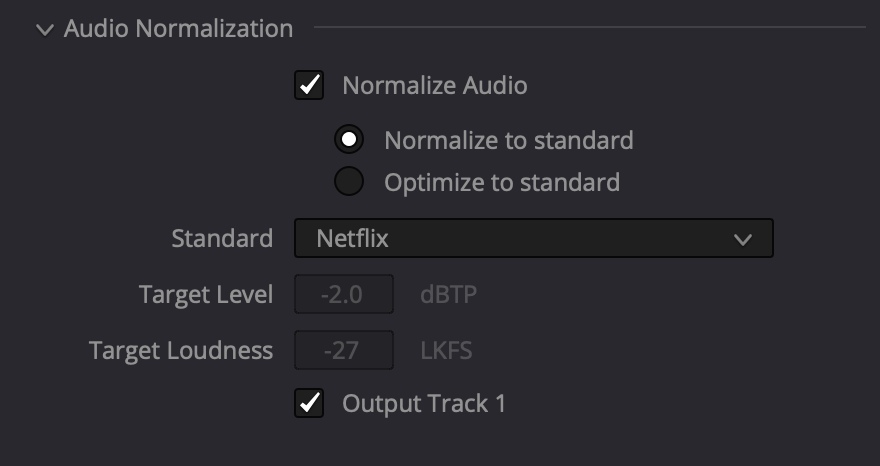
- On export, normalize audio if possible. For example, in Davinci Resolve, we often use the "Netflix" preset.
- On export, normalize audio if possible. For example, in Davinci Resolve, we often use the "Netflix" preset.
No Comments